A subdomain is an additional part of your primary domain. Please, follow this tutorial to remove a subdomain in Plesk.
1. Log in to your Plesk account.
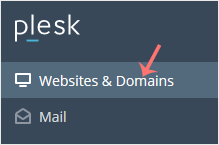
2. Click on Websites & Domains from the Sidebar Menu.
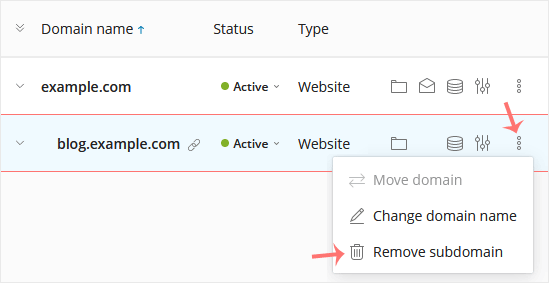
3. Under the list of Domain names, click on the More icon  in front of the subdomain and select Remove subdomain.
4. Confirm with Yes to remove the subdomain.
You can remove a domain in Plesk by following this tutorial. 1. Log in...
1. Log in to your Plesk account. 2. Click on Websites & Domains from...
1. Log in to your Plesk account. 2. Click on Websites & Domains...
1. Log in to your Plesk account. 2. Click on Websites & Domains...
Follow this tutorial to add a new domain to your Plesk account. 1. Log...
