🔥 FIRSATI KAÇIRMA İlk 3 ay %50 indirimle başlayın — Tüm hosting paketlerinde yeni müşterilere özel kampanya! Hemen İncele
Domaintahsis Bilgi Bankası Makale Detayı

How to Add a New Domain in Plesk


Follow this tutorial to add a new domain to your Plesk account.


1. Log in to your Plesk account.

2. Click on Websites & Domains from the Sidebar Menu.

plesk-websites-and-domains-menu.gif


3. Click on Add Domain.

plesk-add-domain-button.gif


4. Please, choose Blank Website as an option.
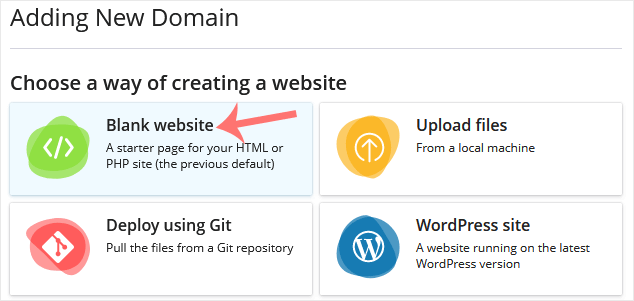
 

5. In Adding New Domain, enter the following details:
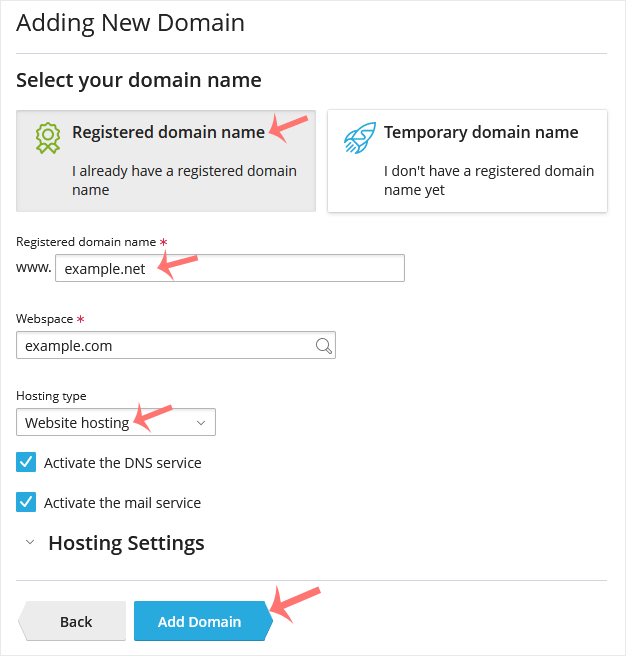
  • Select your domain name: Choose the Registered domain name option. If you don't have a domain, choose Temporary domain name.
  • Registered domain name: Enter your domain name.
  • Hosting Type: Select Website Hosting from the drop-down menu. You can leave all other options as they are.

plesk-add-domain-options.gif

6. Click on Add Domain.


Once your domain is added, you can manage it from the Websites & Domains option.

Bu makale size yardımcı oldu mu?

Cevabınız, dokümanlarımızı geliştirmemize yardımcı olacaktır.

İlgili diğer dökümanlar

  You can remove a domain in Plesk by following this tutorial.   1. Log in...

  1. Log in to your Plesk account. 2. Click on Websites & Domains from...

  1. Log in to your Plesk account.   2. Click on Websites & Domains...

  1. Log in to your Plesk account.   2. Click on Websites & Domains...

A subdomain is an additional part of your primary domain. Please, follow this...