1. Log in to your DirectAdmin Account.
2. In the Account Manager section, click on MySQL Management or type MySQL Management in the navigation filter box. The option will appear. Click on it.
3. From the list of databases, choose the database of your choice. You can select multiple databases for repair.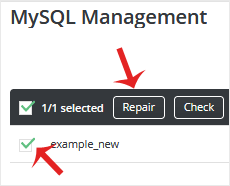
4. Click on Repair.
A report will display after a successful database repair.
1. Log in to your DirectAdmin Account. 2. In the Account Manager section,...
1. Log in to your DirectAdmin Account. 2. In the Account Manager section,...
1. Log in to your DirectAdmin Account. 2. In the Account Manager section,...
1. Log in to your DirectAdmin Account. 2. In the Account Manager section,...
You can remove your database from the DirectAdmin control panel. However, we...
