You can download a backup of FTP data, email, or database-only backup from DirectAdmin's control panel.
How to generate а database-only, FTP, or email backup?
1. Log in to your DirectAdmin account.
2. In the Advanced Features section, click on Create/Restore Backups or type Restore in the navigation filter box, and the option will appear. Click it.
3. Under the Site Backup, should you wish to generate an email-only backup, uncheck all other options and check-mark only the options displayed under email. For FTP only backup, check-mark only the option which displays under FTP. You can do the same for the Database-only backup.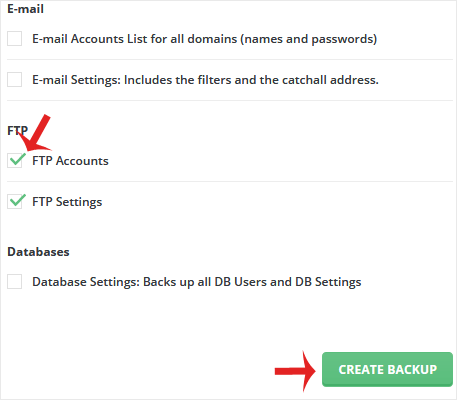
4. Scroll down to the end of the page and click on Create Backup.
5. It will display a success message such as Backup creation added to the queue. Once the backup is generated, it shows a message in DirectAdmin Panel >> Support & Help Section >> Support Center >> Messages.
How to download а generated backup of your account?
1. Log in to your DirectAdmin Account.
2. In the System Info & Files section, click on File Manager or type File Manager in the navigation filter box, and the option will appear. Click on it.
3. Open the backups directory.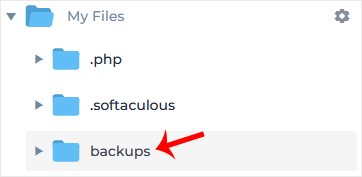
4. Right-click on your newly-generated backup file, and click on Download in the Context Menu. The file will be downloaded to your computer.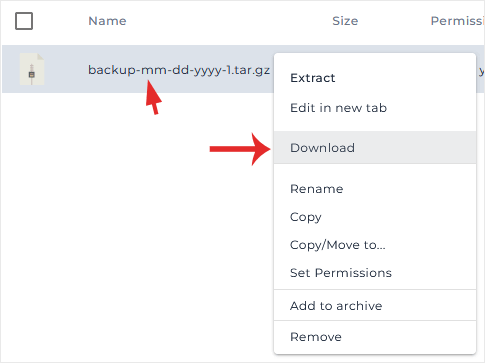
Congratulations. You have successfully generated and downloaded a backup of your selected data.
You can make a backup of your DirectAdmin account and download it. How to...
1. Log in to your DirectAdmin account. 2. In the Advanced Features section,...
You can remove backup files from your DirectAdmin to reduce disk space usage....
