AWStats is an open-source web analytics tool. Follow the steps below to access your AWStats.
1. Log in to your SiteWorx account.
2. In the Statistics section, click on AWStats.
3. Under the Stats Type, click on the available option.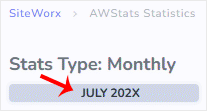
AWStats interface will open, allowing you to examine your website's statistics.
SiteWorx File Manager is handy for managing your website files. 1. Log in...
You can use SiteWorx's inbuilt file manager instead of an FTP program. 1....
You can use SiteWorx's inbuilt file manager to edit files on your website....
Webalizer is an open-source web analytics tool. Follow the steps below to...
You can change your SiteWorx email address by following the steps below. 1....
