If your FTP Account is not in use or you want to suspend it, you can do this in DirectAdmin.
1. Log in to your DirectAdmin Account.
2. In the Account Manager section, click on FTP Management or type FTP Management in the navigation filter box. The option will appear. Click on it.
3. Under the list of FTP Accounts, choose the account you want to suspend.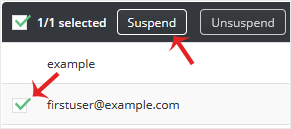
4. Click on Suspend.
Your FTP Account will be suspended. Later, you can start it again by clicking on Unsuspend.
You cannot delete the main FTP account. However, you can remove the...
To change the main root FTP account, you have to change the password of your...
You can access the FTP account using the DirectAdmin login details, which...
