If your email disk quota has been reached and you want to increase or modify it, you can do so in DirectAdmin.
1. Log in to your DirectAdmin Account.
2. In the E-mail Manager section, click on E-mail Accounts or type E-mail Accounts in the navigation filter box, and the option will appear. Click on it.
3. Under the Email Account list, the email address appears with a plus icon on the right side.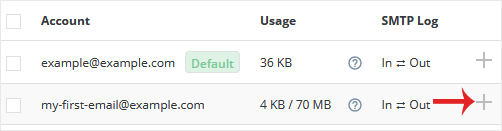
4. Click the Plus icon and choose Change Limits.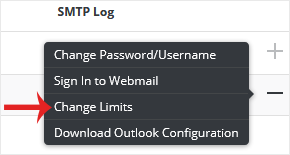
5. Modify the E-mail Quota field as per your requirement. If you have the unlimited option available, choose it instead.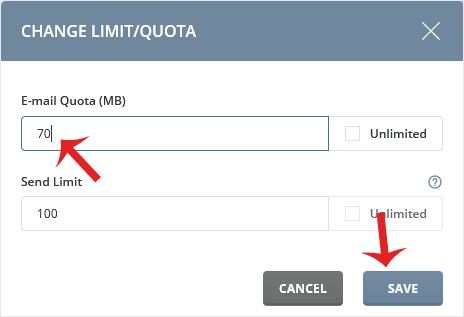
6. Click on Save.
Your email quota limit will be modified.
1. Log in to your DirectAdmin Account. 2. In the E-mail Manager section,...
If you have set the email sending limit while creating your email account,...
To create a new email account, perform the following steps: 1. Log in to...
You can change your email password in DirectAdmin through the following...
You can access your email account from DirectAdmin using two methods. Method...
