You can create predefined packages in the WHM for automation or another purpose.
1. Log in to your WHM Account.
2. Go to Packages >> Add a Package or type Add a Package in the menu filter box. The option will appear. Click on it.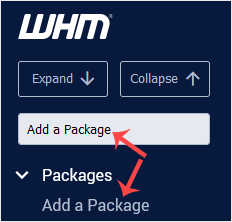
3. Enter the package name and change the resources according to your needs.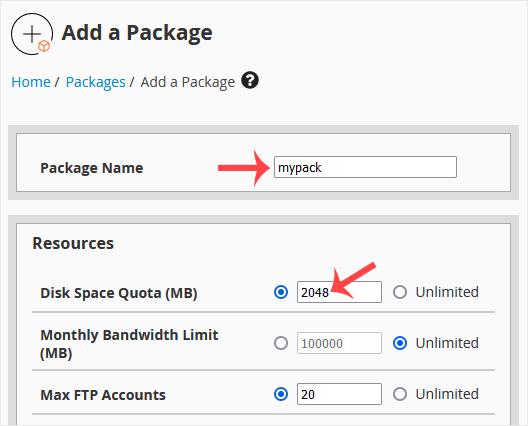
4. Under Settings, enter the following details:
Dedicated IP: Choose this if you want to give each account a dedicated IP or leave it unchecked.
Shell Access: Check this if you want to give SSH access to the user. However, we recommend that you leave it unchecked.
cPanel Theme: Select a theme for the user.
Feature List: If you are not using a custom feature list, leave it as it is.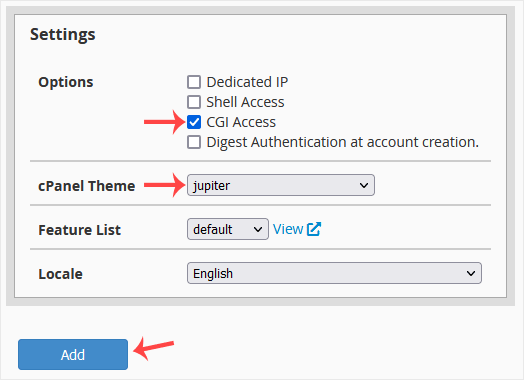
5. Click on Add.
Congratulations: Your new package has been created. Repeat steps 3 to 5 to add more hosting packages.
You can suspend а cPanel user from accessing your WHM account. 1. Log in to...
Do you want to increase or limit cPanel user's bandwidth usage? A WHM user...
Do you want to force cPanel users to change their passwords after login? If...
You can enable/disable features of your customers' cPanel account from WHM....
You can create a feature list from your WHM Account. Feature lists allow you...
