Thunderbird is an email client software. You can work with it in the following way.
1. Open Mozilla Thunderbird.
2. In the left panel, you can see a list of your email accounts. Double-click on Inbox or if it is hidden, click on your email. It will expand to show the inbox, the trash list, etc. 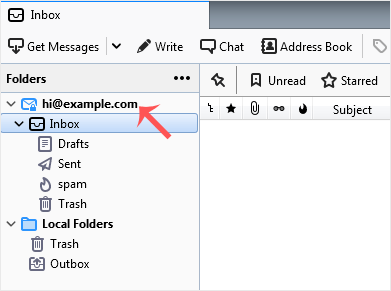
Another option is to right-click on the email address and choose "Get Messages".
Thunderbird also automatically checks email every 5 to 10 minutes. It also does that automatically whenever you open the program.
Thunderbird is a friendly email client software for managing your email. You...
You can send an email using Thunderbird. It is quite straightforward as you...
You can easily remove email in Mozilla Thunderbird. If you use the POP...
You can reply to an email using Mozilla Thunderbird instead of the cPanel...
You can forward an email to other email accounts using Mozilla Thunderbird....
