
🔥 FIRSATI KAÇIRMA İlk 3 ay %50 indirimle başlayın — Tüm hosting paketlerinde yeni müşterilere özel kampanya! Hemen İncele

How to Check the Disk Usage and the Bandwidth Usage of Directories

Dokümantasyon 0 Faydalı Bulundu

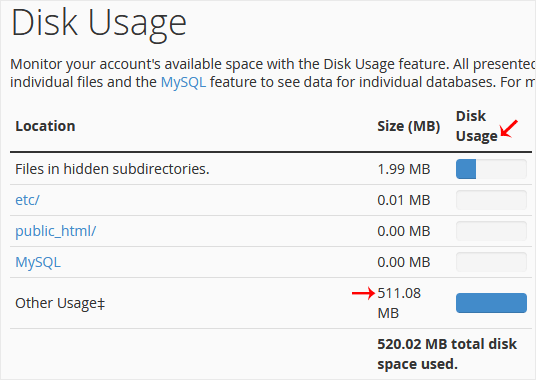
If you are getting a disk space usage warning from cPanel and don't know which directory is using too much space, then this tutorial will be helpful for you.


1. Log in to your cPanel account.


2. In the Files section, click on Disk Usage.
 

3. From the Disk Space Usage area, you can see which directory is using a lot of space and check the disk usage of MySQL.


How to check the Bandwidth Usage?
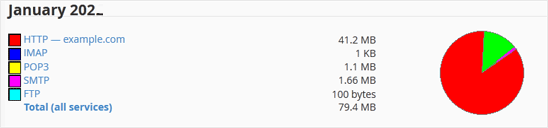
1. In the Metrics section, click on Bandwidth.


2. Here, you can check the bandwidth usage of your domain.
Bu makale size yardımcı oldu mu?

Cevabınız, dokümanlarımızı geliştirmemize yardımcı olacaktır.

İlgili diğer dökümanlar

cPanel hesabınıza erişiminiz varsa, şifrenizi sıfırlamak için aşağıdaki...

Farklı bir stile sahip başka bir cPanel temasına geçiş yapmak kolaydır.1....

FTP programı kullanmak yerine cPanel’in dahili dosya yöneticisini...

1. Log in to your cPanel account. 2. In the Files section, click on File...

1. Log in to your cPanel account. 2. In the Advanced section, click on Cron...